
Week 9 was about learning and understanding some basic tools and its feature.
We explored the eraser tool, and understood its working.
We also learnt for a fact that eraser tool is considered to be a destructive whereas hide tool or clip mask tool is a non- destructive tool.
- We then learnt about the tool layer mask:
Layer mask allows you to hide unwanted part of the image . It works with black and white colour , or gradient.
With the help of black colour you can hide the unwanted parts of the picture and with the help of white colour you can reveal the parts of the picture you want.
MERGE 2 PICTURES AND BLENDING THEM USING LAYER MASK TOOL:
- Place a picture on the canvas
- Add a new layer and place another picture you want to merge with the earlier one
- Then click on the layer mask icon from the layer panel
- A white box will appear next to the original selected layer
- Make sure the new layer mask box that has appeared is selected and
- Then by using brush tool with black and white as fore ground and background colour you can draw over the picture in order to hide unwanted parts or reveal wanted parts of the picture.

- PLACING A PICTURE IN A PICTURE AND BLENDING USING LAYER MASK:
- Place a picture on the canvas
- Place another picture which you want to fit inside the first picture on a new layer
- Click on layer mask tool on the layer panel
- Then by ctrl t transformation you can roughly place and size the picture the way you want .
- Then using brush tool draw over the second picture in order to hide the unwanted parts.

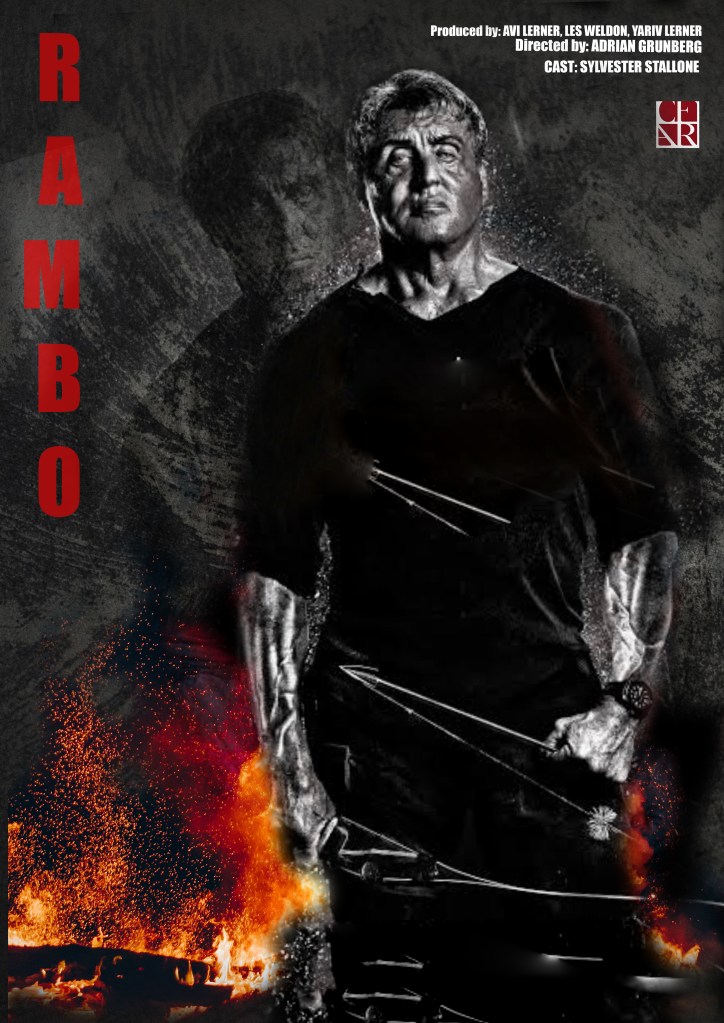
The second half of the class was about self exploration, self practice and completing the project of preparing a film poster.
This time was very useful as we could practice whatever we learnt so far , and get are doubts cleared.
Also we were completing our project of movie posters.
Initially I felt both illustrator as well as photoshop to be very challenging and didn’t interest me much , as weeks passed by and I could understand as to how these software work and how they operate , I have gained a lot of confidence in using both the software , also I love exploring and experimenting new things using the same.

 Sanjana blogs